

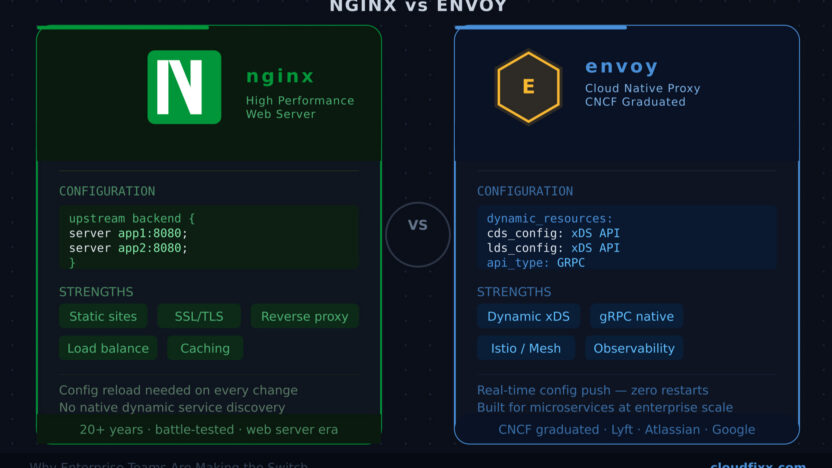
A senior engineer at Atlassian (Vasilios Syrakis) was handed a blank slate — build a brand-new internal service broker platform from scratch. The first real decision? Which proxy technology to bet the entire architecture on.
He knew NGINX well. Most engineers do. It’s been the backbone of reverse proxying and load balancing for over two decades. But after evaluating the options, he chose Envoy — and it changed the way the entire platform was built.
If you’ve already read our guides on What is NGINX? and Mastering NGINX Configurations, you know how powerful NGINX is. But the infrastructure world is evolving fast — and Envoy is showing up in more and more enterprise stacks at companies like Lyft, Google, Apple, and yes, Atlassian.
So what exactly is Envoy, how does it compare to NGINX, and when should you actually make the switch? Let’s break it down.
What is Envoy?
Envoy is an open-source, high-performance edge and service proxy originally built by Lyft in 2016 and donated to the Cloud Native Computing Foundation (CNCF) in 2017. Today it’s a graduated CNCF project — the same tier as Kubernetes and Prometheus.
Unlike NGINX, which was designed as a web server first and later extended with proxy capabilities, Envoy was built from the ground up as a proxy for distributed systems and microservices. Its design philosophy is simple: the network should be transparent to applications, and when it isn’t, the proxy should surface the problem clearly.
Key capabilities of Envoy include:
- L3/L4 and L7 Proxy:
- Envoy operates at both the network (TCP/UDP) and application layer (HTTP/1.1, HTTP/2, gRPC). It understands your traffic deeply — not just where it’s going, but what it’s carrying.
- xDS Control Plane (Dynamic Configuration):
- This is Envoy’s superpower. Instead of editing static config files and reloading, Envoy can receive configuration updates in real-time from a control plane over gRPC. No restarts. No downtime. No config drift.
- First-Class Observability:
- Envoy emits detailed stats, distributed traces (Zipkin, Jaeger, Datadog), and access logs out of the box for every single request — making debugging in production dramatically easier.
- gRPC and HTTP/2 Native Support:
- NGINX supports gRPC but requires additional configuration. Envoy treats gRPC and HTTP/2 as first-class citizens — crucial for modern microservice architectures.
- Advanced Load Balancing:
- Beyond round-robin, Envoy supports least-request, ring hash, maglev, and random load balancing algorithms with automatic outlier detection built in.
- Service Mesh Ready:
- Envoy is the data plane behind Istio, AWS App Mesh, and Consul Connect. If you’re moving towards a service mesh, Envoy is already the foundation.
NGINX vs Envoy: Head-to-Head Comparison
| Feature | NGINX | Envoy |
|---|---|---|
| Primary Design | Web Server + Proxy | Proxy-first (cloud-native) |
| Configuration | Static files, reload required | Dynamic via xDS API (no reload) |
| Observability | Basic access logs | Rich metrics, traces, stats per-request |
| HTTP/2 & gRPC | Supported (extra config) | Native, first-class support |
| Load Balancing Algorithms | Round-robin, least-conn, IP hash | Round-robin, least-request, ring hash, maglev + more |
| Service Mesh Integration | Limited | Core data plane for Istio, App Mesh |
| Learning Curve | Low — widely known | Steeper — YAML-heavy, new concepts |
| Community & Maturity | 20+ years, massive community | ~8 years, rapidly growing, CNCF graduated |
| Best For | Static sites, simple reverse proxy, SSL termination | Microservices, service mesh, dynamic enterprise platforms |
| Performance | Excellent | Excellent (comparable, slightly higher resource use) |
The Real Difference: Static vs Dynamic Configuration
This is where NGINX and Envoy truly diverge — and it’s the reason the Atlassian engineer’s choice made sense.
With NGINX, when you need to change upstream servers, add a new route, or update load balancing weights — you edit the nginx.conf file and reload the process. For simple setups, this is fine. But in a large enterprise with hundreds of services, dynamic service discovery, and constant deployments, reloading config becomes a bottleneck.
# NGINX — static upstream config
upstream backend {
    server backend1.example.com:8080;
    server backend2.example.com:8080;
}

server {
    listen 80;
    location / {
        proxy_pass http://backend;
    }
}
With Envoy, configuration is delivered dynamically via the xDS (Discovery Service) APIs — Listener Discovery Service (LDS), Route Discovery Service (RDS), Cluster Discovery Service (CDS), and Endpoint Discovery Service (EDS). The proxy updates itself in real time without any restart.
# Envoy — static bootstrap config (real config served dynamically by control plane)
node:
  id: envoy-proxy-1
  cluster: my-service-cluster

dynamic_resources:
  lds_config:
    api_config_source:
      api_type: GRPC
      grpc_services:
        - envoy_grpc:
            cluster_name: xds_cluster
  cds_config:
    api_config_source:
      api_type: GRPC
      grpc_services:
        - envoy_grpc:
            cluster_name: xds_cluster
In the Atlassian platform, the engineer built an xDS Control Plane that sat on top of Envoy and pushed configuration changes dynamically to all proxy instances. New services could be registered, traffic could be shifted, and load balancing policies could be updated — all without touching any individual proxy.
That’s simply not possible with NGINX in the same way.
Observability: Where Envoy Leaves NGINX Behind
In a microservices environment, when a request fails, you need to know exactly where it failed — which service, which hop, which network call.
NGINX gives you access logs. They’re useful, but they’re limited to the edge.
Envoy emits per-request stats at every proxy hop — latency histograms, request counts, error rates, retry attempts, circuit breaker state — and natively integrates with distributed tracing systems. By the time a request traverses 5 services, you have a full trace of every millisecond.
This is exactly what SRE teams need for the Golden Signals — latency, traffic, errors, and saturation — all surfaced automatically, with no extra instrumentation required.
When Should You Still Use NGINX?
Envoy is powerful, but it’s not the right tool for every job. Here’s when NGINX remains the better choice:
- Serving static content — NGINX is a battle-tested web server. Envoy is not designed for this.
- Simple reverse proxy setups — If you have a straightforward single-service deployment, NGINX’s simplicity wins.
- SSL termination at the edge — NGINX handles SSL/TLS termination elegantly with minimal config.
- Small teams or early-stage products — Envoy’s learning curve and operational overhead aren’t worth it unless you have scale problems.
- Legacy infrastructure — If your stack doesn’t use service discovery, containers, or dynamic routing, NGINX fits better.
When You Should Switch to Envoy
- You’re running microservices at scale — Multiple services, dynamic routing, service-to-service traffic
- You need dynamic configuration — Services registering and deregistering constantly without proxy restarts
- You’re adopting a service mesh — Istio, Consul Connect, or AWS App Mesh all use Envoy as the data plane
- You need deep observability — Distributed traces, per-service error rates, and latency breakdowns
- You’re building a platform — Internal developer platforms, API gateways, or multi-tenant infrastructure
- gRPC is a first-class citizen — Envoy handles gRPC transparently; NGINX requires explicit configuration
The Bottom Line
NGINX and Envoy are both excellent proxies — but they were built for different eras of infrastructure.
NGINX was built for the web server age — fast, stable, simple. It’s still the right choice for millions of use cases.
Envoy was built for the cloud-native age — dynamic, observable, programmable. When an Atlassian engineer was building an enterprise-grade internal platform on AWS, Envoy wasn’t just the better choice — it was the only choice that made the architecture possible.
If your stack is growing, your services are multiplying, and your on-call rotations are getting harder — it’s worth taking a serious look at Envoy.
If you’re just getting started with proxy concepts, check out our guides on What is NGINX? and Mastering NGINX Configurations before diving into Envoy.
Need Help With Your Infrastructure?
If you’re evaluating a proxy migration, designing a cloud-native platform, or simply not sure where to start — you don’t have to figure it out alone.
iTransversal specializes in cloud architecture and DevOps consulting, helping teams make the right infrastructure decisions from day one. Whether you’re moving to Envoy, building on AWS, or scaling your microservices stack, their cloud architects have done it before.
Visit itransversal.cl to learn more, or schedule a direct meeting with their Cloud Architect to talk through your specific use case.
Tags: DevOps Proxy Load Balancing Envoy NGINX Platform Engineering Cloud Native